Follow a vendor from application to payout.
See how Juniper Home Goods gets a booth, adds a product, makes a sale, and receives a payout statement. This guided walkthrough uses sample data and requires no sign-in.
Start the tour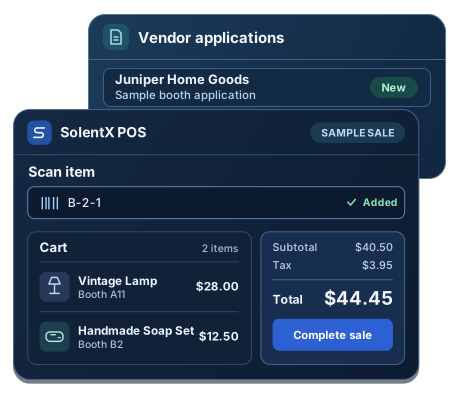
Review a new vendor application
Juniper Home Goods applies on the market’s public website. The owner reviews the business, products, and space preferences, then approves the application and creates a vendor record from the submitted details.
Juniper Home Goods
- Business name
- Juniper Home Goods
- Products
- Handmade soaps and home goods
- Space preference
- Small booth
- Application status
- Approved
Give the vendor a selling space
The owner links Juniper Home Goods to Booth B2. The booth’s configured rent carries into the assignment. Once the vendor’s setup is ready, the owner can send a portal invitation.
Space assignment
- Vendor
- Juniper Home Goods
- Location
- Booth B2
- Space rent
- $100/month
- End date
- Ongoing
- Primary assignment
- Yes
Put a vendor’s item on the shelf
Staff can add the soap set from the Owner Portal, or Juniper can enter it in the Vendor Portal when the owner enables product access. Either path keeps the item linked to the same seller at checkout.
Add Product
Product basics, vendor and location, barcode or lookup code, and stock.
- Product name
- Handmade Soap Set
- Price
- $12.50
- On-hand stock
- 8
- Vendor
- Juniper Home Goods
- Location
- Booth B2
- Barcode / lookup code
B-2-1
Add Product
Juniper Home Goods enters the item in its own catalog.
- Product name
- Handmade Soap Set
- Price
- $12.50
- On-hand stock
- 8
- Location
- Booth B2
- Barcode / lookup code
B-2-1
Ring up items from two booths
The cashier enters B-2-1 and adds a lamp from another booth. The shopper gets one receipt, and SolentX records which vendor sold each item.
Scan item
B-2-1Added to cartCart
- Vintage LampBooth A11 · Qty 1$28.00
- Handmade Soap SetBooth B2 · Juniper Home Goods · Qty 1$12.50
Totals (2)
- Payment Type
- Cash
- Subtotal
- $40.50
- Tax
- $3.95
- Total
- $44.45
See what sold and what’s owed
The checkout appears in today’s market activity. The owner can review sales, see estimated vendor liability, and follow up on applications and payouts.
Good Morning, Market Owner
Here is what needs your attention today.
Today’s Market Activity
- Gross sales
- $44.45
- Transactions
- 1
- Items sold
- 2
- Estimated vendor liability
- $32.40
Operations Overview
- Applications & Waitlist2 need review
- Payouts$32.40 pending
Let sellers see their side of the sale
Juniper Home Goods sees the soap set sale, its remaining stock, and its estimated payout. The lamp belongs to another vendor and stays out of Juniper’s view.
Welcome, Juniper Home Goods
You’re all caught up.
Manage your market activity
- Today’s sales
- $12.50
- Pending payout
- $10.00
- Assigned space
- Booth B2
Products & inventory
- Handmade Soap SetB-2-1 · $12.507 on hand
Prepare the statement and record payment
The owner generates Juniper’s statement from its recorded sales. The soap set sold for $12.50 before tax. After a $2.50 commission, Juniper is owed $10.00. The owner pays Juniper outside SolentX and records the payment on the statement.
Payout Summary
Juniper Home Goods · Sample statement
- Vendor sales
- $12.50
- Commission
- $2.50
- Net payout
- $10.00
Statements
- Juniper Home GoodsPaid by bank transfer outside SolentXPayment recorded